
Music for a product demo video, timed to its cuts
We gave Claude Code a 30-second demo's cut list and asked Instant DJ for a score: quiet under the voice, a riser into the feature, an impact on the logo. In the exported WAV the hits land within 5 ms of the cuts. The brief, the steps and the numbers.
Most product videos get a stock track cut to length, so the music swells in the wrong place and the logo lands between two beats. A score written to the video’s cut list avoids that: it goes quiet when someone talks, builds into the moment that matters and hits on the cut. We asked Claude Code, connected to Instant DJ, to score a 30-second app demo from its cut list alone.
The brief
The cut list is an example of a typical 30-second demo, not a real video. We gave Claude Code this one request and let it use Instant DJ’s tools without asking each time:
In Instant DJ’s Studio, score a 30-second product demo video. The cuts are at 0:00 (the logo), 0:03 (the problem), 0:10 (the app opens), 0:18 (the feature in action) and 0:26 (the logo and the price), and the video ends at 0:30. Someone talks from 0:03 to 0:18, so keep the music low and out of the way of the voice there. Build into 0:18 with a riser, hit an impact exactly on 0:26, and end cleanly at 0:30. Pick a tempo that puts the cuts on the beat. Call the song “Demo Score”. Render, analyse and fix what the analysis flags, master it to −14 LUFS with the ceiling at −1.5 dB, and export a WAV. Don’t open, change or delete any of my other songs, and don’t play anything through the speakers. At the end, tell me the tempo you chose, where each cut lands, what you changed after the analysis, and the final numbers.
The tempo that fits the cuts
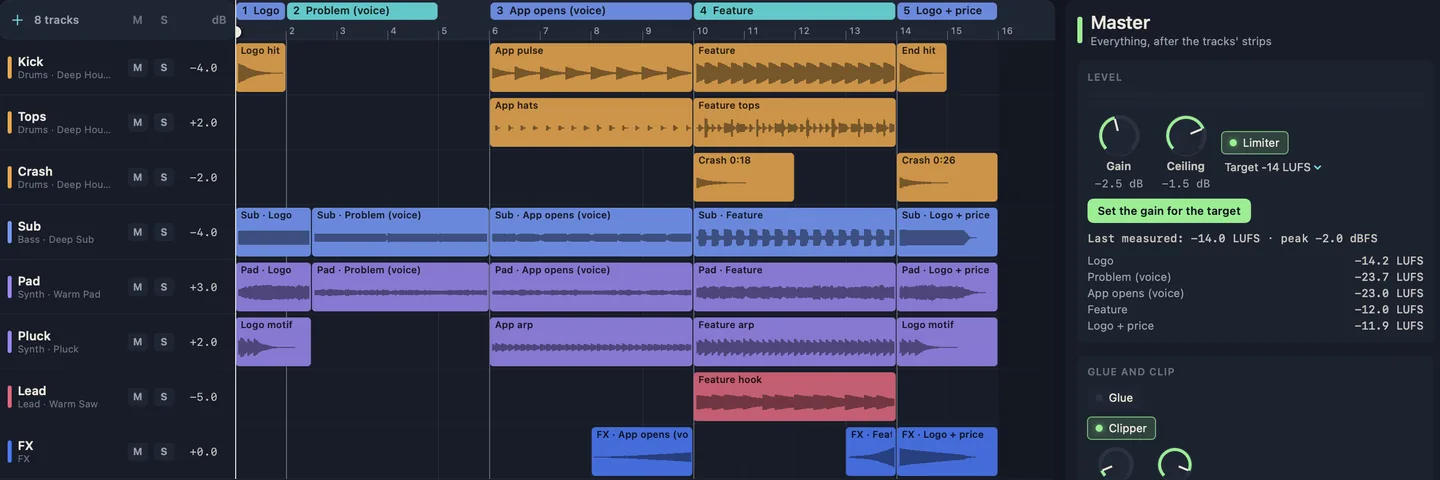
It chose 120 BPM in D major. At that tempo a beat is half a second and a bar is two seconds, so every cut falls on a beat and the whole score is exactly 15 bars:
- 0:00, the logo (bar 1, beat 1): a kick, a D chord and a four-note motif.
- 0:03, the problem (bar 2, beat 3): the music changes to B minor and thins to a filtered pad and sub bass.
- 0:10, the app opens (bar 6, beat 1): a soft half-time kick, quiet hats and a quiet arpeggio.
- 0:18, the feature (bar 10, beat 1): the full groove, the hook and a crash, after a riser from 0:14.
- 0:26, the logo and price (bar 14, beat 1): an impact, the kick and a crash, with the opening motif again.
- 0:30, the end (end of bar 15): faded out.
The same arithmetic works for any cut list: find a tempo where the gaps between cuts are whole beats.
What Claude Code did
It took about three minutes and 29 calls to Instant DJ:
- Read the Studio guide and checked what was open.
- Wrote the score: eight tracks (kick, hats, crash, sub bass, pad, pluck, lead and effects) and five sections named after the shots, so the timeline reads like the edit.
- Rendered and analysed it. The analysis flagged two things. The loudest moment, the impact at 0:26, peaked at +0.5 dBFS, and the master could only reach −15.6 LUFS of the −14 asked for, because the peaks stood 16 dB over the average. And the pluck and the lead were crowding each other in the feature.
- Fixed both: clippers on the pluck, kick and effects tracks and a light one on the master, which let it reach −14; the pluck panned left and the lead slightly right.
- Then went further on its own. It pulled the sub, pad, kick and arpeggio down again between 0:03 and 0:18, and cut the arpeggio once more when the clipper had made it louder under the voice. It added three bars after 0:30 to check they were silent (they peaked at −77 dBFS), then took them out. One edit was refused, with the reason (a section missing its start bar), and it fixed that on the next call.
- Analysed again: “nothing stands out in the numbers — listen”. Then it mastered the score to −14 LUFS, saved it and exported a WAV.
The numbers
| Demo Score | |
|---|---|
| Integrated loudness | −14.0 LUFS |
| True peak (our LUFS meter) | −2.0 dBTP |
| Logo | −14.2 LUFS |
| Problem (voice) | −23.7 LUFS |
| App opens (voice) | −23.0 LUFS |
| Feature | −12.0 LUFS |
| Logo and price | −11.9 LUFS |
The music under the voice sits about 11 LU below the feature. We then checked the timing in the WAV itself: the biggest jump in level at 0:00, 0:10, 0:18 and 0:26 lands within 5 milliseconds of each cut, as fine as our measurement goes. At 0:03 there’s no hit to find; the music changes chord and gets quieter there, as described.
Three things to check against the picture
- The riser. It plays under the last four seconds of the voice, from 0:14 to 0:18. Claude Code pointed this out itself: if it fights the narration, turn it down first.
- The end. The music is silent by 0:30, but the WAV runs to 35.6 seconds. Trim it at 0:30 in your editor.
- Your ears. Claude Code can’t hear, and said so: everything above is measured. Play the score against the video before you publish it.
With a real video, give exact cut times from your editor’s timeline, say where people talk, and say what each moment needs. For scoring a longer video and adding sound effects, see AI background music and sound effects for videos.
What you need
- Instant DJ 1.6 or later on a Mac with Apple silicon, macOS 14 or later: free for 7 days with every feature, then one in-app purchase, US$9.99 during the launch sale, with no subscription.
- Claude Code, or any other MCP client, connected as on Instant DJ’s MCP page, with its own plan.
Questions, answered
- How do I time music to the cuts in a video?
- Pick a tempo where the time between cuts is a whole number of beats, then put the changes on those beats. At 120 BPM a beat is half a second and a bar is two seconds, so cuts at 0:10, 0:18 and 0:26 all fall on a downbeat. In Instant DJ you can give an AI assistant the cut times and let it do the arithmetic.
- How loud should the music be under a voiceover?
- Low enough that every word is clear. In our example the music under the voice sits about 11 LU below the feature that follows it. Listen with the voice in place: that's the test that counts.
- Can I use the music in my product video?
- The score is built from Instant DJ's own instruments and kits, so there's no stock-music licence to buy for them. Samples you add yourself keep their own terms, and copying a known melody can still infringe.
- What loudness should video music be?
- YouTube, Instagram and TikTok don't publish a loudness target. We mastered to −14 LUFS, the figure Spotify publishes, as a reference, and checked it with our free LUFS meter.