
Making music with Claude Code: one prompt, a mastered song
We gave Claude Code one request and Instant DJ's tools on a Mac. In about two and a half minutes it wrote a two-minute melodic house track, fixed what the analysis flagged, mastered it to −14 LUFS and exported a WAV. Every step, with the numbers.
Claude Code is best known for writing software, but connected to the right app it can write a song. Instant DJ for Mac has an MCP server built in, so Claude Code can write tracks in its Studio, render them, read the result in numbers, fix what the numbers show, master the song and export it. We gave it one request to see what happens. Here is the session, step by step.
The setup
Two steps, once. In Instant DJ 1.6, switch on Setup → AI tools (MCP). Then, in Terminal:
claude mcp add --scope user --transport http instantdj http://127.0.0.1:47231/mcpConnecting your assistant has the same lines for Codex and other MCP clients, and the full list of tools. Instant DJ’s server only accepts connections from your own Mac.
The request
We ran Claude Code with this one request and let it use Instant DJ’s tools without asking each time (claude -p "…" --allowedTools "mcp__instantdj"):
Write me a new song in Instant DJ’s Studio: melodic house, 122 BPM, A minor, about two minutes, called “Glasshouse”. Give it an intro, a build, a drop and an outro. When it’s written, render it, run the analysis, and fix anything the analysis flags. Then master it to −14 LUFS for streaming with the ceiling at −1 dB, and export a WAV. Don’t open, change or delete any of my other songs, and don’t play anything through the speakers. At the end, tell me what you changed after the analysis, and the final numbers.
What Claude Code did
It finished in about two and a half minutes, with 13 calls to Instant DJ:
- Read the Studio guide, the app’s own reference for writing a song.
- Checked what was open and listed the saved songs.
- Wrote the whole song in one call: 64 bars at 122 BPM in A minor, over A minor, F, C and G. Ten tracks: kick, hats and claps, a snare roll, congas, bass, a pad, a pluck arpeggio, chord stabs, a lead and effects. Four sections: Intro (bars 1–16), Build (17–32), Drop (33–56) and Outro (57–64). The build drops the kick at bar 25 for a snare roll, a riser and a filtered taste of the lead; the drop brings in the rolling bass and, from bar 41, the lead melody.
- Rendered it: 2:06.
- Ran the analysis. It flagged one thing: the pluck arpeggio and the lead were “both narrow, both centre on the mid band and sit within 3 LU of each other in Build”. It also showed that the mix, before mastering, peaked at +0.6 dBFS at bar 16, beat 4, mostly from the hats and claps.
- Fixed both. It panned the pluck further right (0.25 to 0.4), gave the lead some stereo width, turned the lead down 1 dB and its teaser in the build further, and put a clipper on the hats and claps, which brought the peak at bar 16 down to −0.4 dBFS. The clipper also made them about 3 dB louder, which it pointed out.
- Analysed again: “nothing stands out in the numbers — listen”.
- Mastered to −14 LUFS: the master needed +0.5 dB to get there.
- Saved the song and exported a WAV.
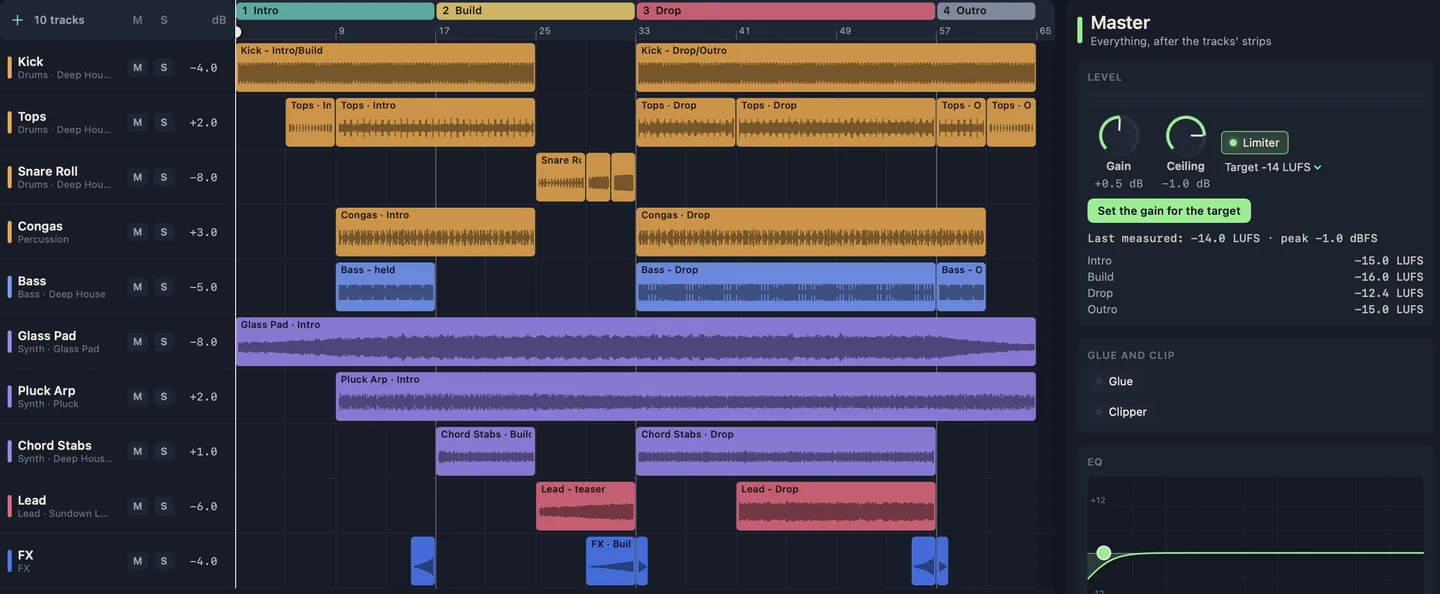
Then it summed up, and ended with a line worth keeping: “I measured it; nobody has listened to it yet.”
The numbers
| Glasshouse | |
|---|---|
| Integrated loudness | −14.0 LUFS |
| Intro | −15.0 LUFS |
| Build | −16.0 LUFS |
| Drop | −12.4 LUFS |
| Outro | −15.0 LUFS |
| Sample peak | −1.0 dBFS |
| True peak (our LUFS meter) | −0.7 dBTP |
| Length | 2:06 (the WAV is 2:14, with its tail) |
The drop is the loudest section, 3.6 LU above the build, as a drop should be. One number is worth acting on. Spotify suggests keeping the true peak below −1 dBTP for a −14 LUFS master, and this WAV’s true peak, which counts peaks between the samples, comes out at −0.7. For a Spotify upload we’d turn the ceiling down a little and measure again. How loud should a song be for Spotify? explains why.
What it can and can’t do
Claude Code can’t hear. It works from what the app measures: loudness, peaks, the balance across six frequency bands, the level of each section, and notes on what stands out. That catches real problems, as the clash between the pluck and the lead shows, but “nothing stands out” means balanced, not good. Your ears decide that. We call this way of working assistant-composed music.
The Studio also has limits worth knowing before you start. There’s no singing voice: a sung part has to be a recording. Notes are written as data, by the assistant or in the song file, rather than in a piano roll. What you can do by hand is arrange, mix and master, and ask for changes in plain words, such as “make the drop hit harder” or “give the lead more room”.
Two more sessions like this one: music for a product demo video, timed to its cuts, and podcast intro music at Apple’s −16 LUFS. For scoring a longer video with sound effects, see AI background music and sound effects for videos.
What you need
- Instant DJ 1.6 or later on a Mac with Apple silicon, macOS 14 or later. It’s free for 7 days with every feature, then one in-app purchase: US$9.99 during the launch sale, with no subscription.
- Claude Code, or any other MCP client, with its own plan.
Questions, answered
- Can Claude Code make music?
- Yes, when it's connected to an app that makes the sound. Connected to Instant DJ's MCP server on a Mac, Claude Code writes a song's notes, drums and mix in the Studio, and the app renders, analyses, masters and exports it. In our session one request became a mastered two-minute WAV.
- Do I need to know music theory?
- No. Say what you want, such as a style, a tempo, a key or a mood and a length, and Claude Code writes the parts. You can change anything afterwards, by asking or by hand in the Studio.
- Does it work with Codex or other assistants?
- Yes. Any MCP client on the same Mac can connect. The setup lines for Claude Code, Codex and other clients are on Instant DJ's MCP page.
- Can I use the music it makes?
- The song is built from Instant DJ's own instruments and kits, so there's no stock-music licence to buy for them. Samples you add yourself keep their own terms, and copying a known melody can still infringe.
- Does my music leave my Mac?
- Instant DJ sends nothing anywhere. Claude Code is a cloud assistant, so your request and what it reads from the app go to Anthropic, as in any Claude Code session.