
Background music and sound effects for your videos, written by your AI assistant and made on your Mac
Connect an AI assistant to Instant DJ and ask for a score for your video: it writes the music, the risers and the hits, Instant DJ renders and masters them on your Mac, and you get a WAV with nothing downloaded and no stock-music licence.
Connect your AI assistant to Instant DJ, tell it what your video needs and where its cuts fall, and it writes the score: the background music, the risers into each cut, the hit on the reveal. Instant DJ renders every part on your Mac, measures and masters the mix, and exports a WAV you drop into your editor. Nothing is downloaded, and the sounds are the app’s own.
We first used it on a product demo for ReelFyre, our reel editor: the background music and the sound effects on each cut were written this way, and that demo now runs as one of our ads on Meta. Instead of searching a stock library for something close, we asked for exactly the length, mood and hits the edit needed, and changed what didn’t fit by asking again.
What you need
- Instant DJ 1.6 or later on a Mac with Apple silicon, macOS 14 or later. It’s a free download with every feature for 7 days, then one purchase, US$9.99 during the launch sale, with no subscription.
- An AI assistant that supports MCP (the Model Context Protocol), such as Claude Code or Codex.
- The AI tools switched on in Instant DJ, under Setup › AI tools (MCP). The connect command is there with a Copy button. For Claude Code it is:
claude mcp add --scope user --transport http instantdj http://127.0.0.1:47231/mcpThe connection stays on your Mac: Instant DJ answers only local MCP clients and refuses requests from web pages. It is off until you switch it on.
How it works
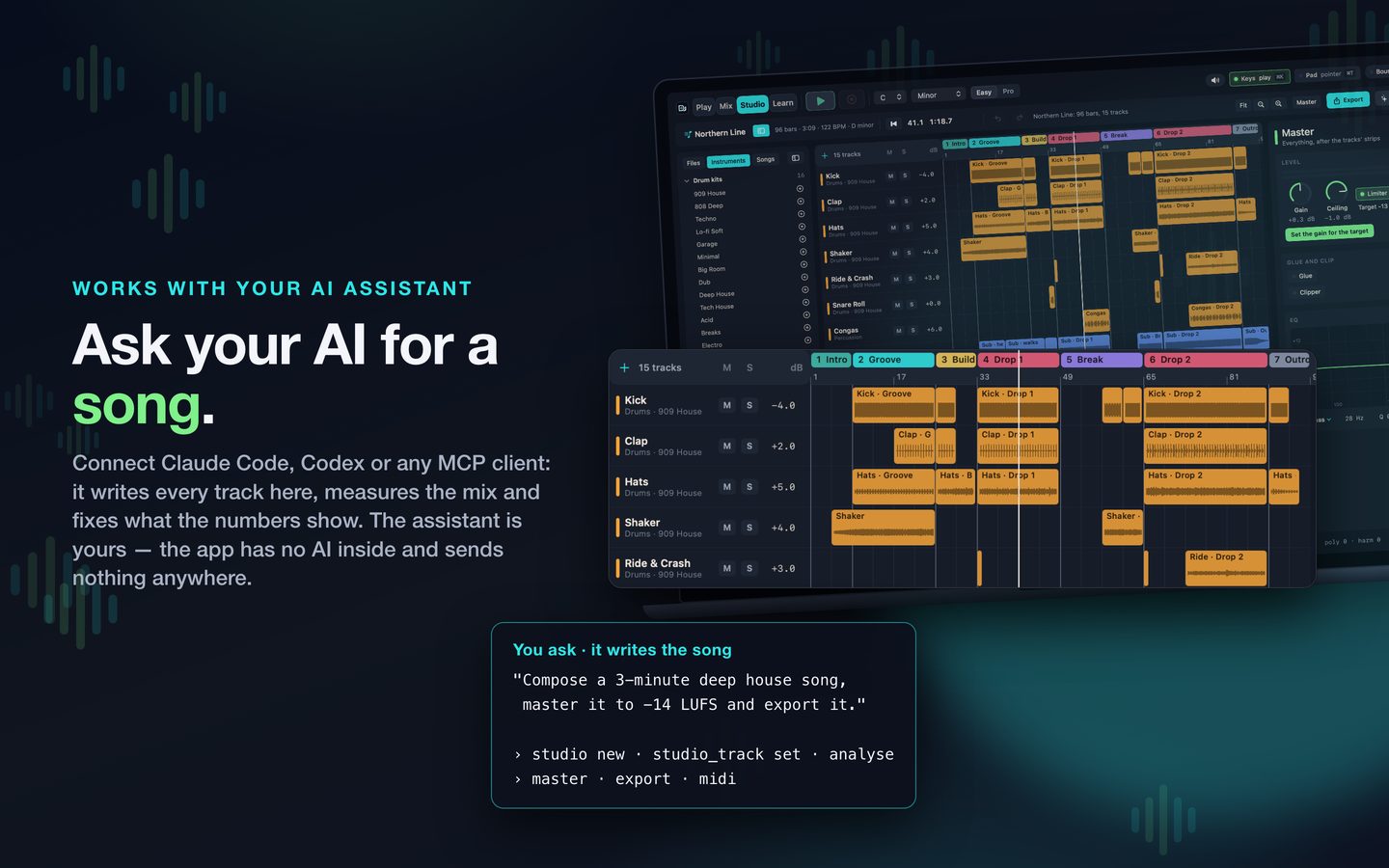
From Instant DJ’s App Store listing.
Instant DJ’s Studio holds a whole song on a timeline, up to 32 tracks, each with its own sound and its own strip on a mixing desk. Your assistant writes that song as data: the tracks, the notes, the drum patterns, the mix and the knob moves. We call this assistant-composed music: the assistant works the app, and the app’s instruments play the result.
- You describe it. “A 30-second warm background for a product video at 120 BPM, quiet under the voice, a riser into the reveal at 0:20 and a hit on it.”
- The assistant writes it. It reads the Studio’s guide (every preset, drum and parameter on your Mac), then writes the tracks into a song.
- Instant DJ renders it. Each track is rendered by the app’s own engine into a stem, much faster than real time. Our 15-track showcase song, 3 minutes 9 seconds long, renders all its stems in about 15 seconds on an M-series MacBook Pro.
- The assistant checks it. Nobody in that loop can hear the song, so Instant DJ reports what an ear would notice: loudness, peaks, the energy in six bands, a drop no louder than what came before it, a melody buried under the drums. The assistant fixes what the numbers show.
- You listen and steer. Play it in the Studio, ask for changes, and the assistant edits only what you named.
- It’s mastered and exported. The master sets its level for the loudness you choose, for example −14 LUFS, and exports a WAV or M4A, each track as a stem, or the notes as a MIDI file.
Timing music to a video
The Studio counts in bars, and the tempo turns bars into seconds: at 120 BPM a bar of four beats is exactly 2 seconds. Give your assistant the video’s cut points in seconds and the tempo, and it places each riser, hit and change on the right bar.
If the video has a voice-over, put the recording on an audio track in the Studio so the music can be written around it, then mute it before you export. Audio clips aren’t stretched to the tempo, so keep the recording as it is.
Sound effects, made to fit
The Studio has effect tracks for the sounds that carry an edit: risers that build into a cut, swells, impacts on the moment itself and sweeps across a transition, each placed on the bar you choose. Short stings come from the instruments: a pluck on a lead, a bass hit, a chord stab, a drum fill.
Because they are written into the same song as the music, they’re in the same key and on the same beat, and they’re mixed and mastered together.
Can you use the music?
Instant DJ’s synthesizers and drum kits are its own, and the percussion recordings it ships with are CC0, dedicated to the public domain. A track built from those uses no sample pack and no stock-music licence, and nothing is downloaded to make it.
Two cautions. Sounds you bring in yourself, such as your own samples, recordings or Audio Unit plugins, keep their own terms. And ask for original music: a request to recreate a well-known song can produce something that copies its melody, which no tool makes yours to use.
Then put it under your video
Export the WAV and add it in your editor. In ReelFyre, our reel editor, you can add your own music and keep it under the speaker’s voice.
What it doesn’t do yet
- No singing. There is no singing synthesizer; a sung line has to be a recording on an audio track.
- No piano roll. Notes are written as data by the assistant or in the song file. The Studio’s screen is for arranging, mixing and mastering by ear.
- Mac only for the AI tools. The iPad edition has the Studio but no AI tools.
- Your assistant does the writing. Instant DJ has no AI inside. How good the score is depends on your assistant and on how clearly you describe what you want.
For how the connection between the assistant and the app is built, see building an MCP server for an app the AI can’t hear.
Instant DJ is on the Mac App Store, free for 7 days. More on the app on its page.
Questions, answered
- Can an AI assistant make background music for my videos?
- Yes, with Instant DJ on a Mac. Connect an assistant that supports MCP, such as Claude Code or Codex, describe the video and its timings, and it writes the music and effects in Instant DJ's Studio. The app renders, masters and exports them as a WAV or M4A file.
- Does Instant DJ have AI inside it?
- No. Instant DJ has no AI inside and sends nothing anywhere. Your own assistant connects to it on your Mac, only after you switch the AI tools on in Setup.
- Can I use the music in my videos?
- A track built from Instant DJ's own synthesizers and kits, and the CC0 public-domain percussion recordings it ships with, needs no stock-music or sample licence. Sounds you add yourself, such as your own samples or plugins, keep their own terms, and asking for a copy of a well-known melody can still infringe it.
- Can it make sound effects?
- Yes: risers, swells, impacts and sweeps, placed on the bar you choose, and short stings played on its instruments, such as a pluck or a bass hit.
- Does it work on iPad or Windows?
- The AI tools are in the Mac app only, on Macs with Apple silicon running macOS 14 or later. The iPad edition has the Studio but no AI tools, and there is no Windows version.