
Why Shazam can't identify sped-up songs, and what to do
Speeding a song up changes its pitch and tempo, so its fingerprint no longer matches the original recording. What that means for sped-up, nightcore and slowed edits, and three ways to find the original.
Recognition apps identify a song by its fingerprint: a compact description of how the recording sounds over time. Speed a track up and both its pitch and its tempo change, so the edit’s fingerprint no longer lines up with the original recording’s. The app isn’t broken. It is being asked about a recording that isn’t in its catalog.
It doesn’t always fail
Many sped-up versions have been released officially, and those releases are in the catalog like any other track, so they match. What fails is the unofficial edit: someone’s own sped-up, nightcore or slowed version of a song, uploaded as the sound of a video.
Slowed edits are the same problem in the other direction. The track runs slower and lower, and the fingerprint moves with it: see how to find the original of a slowed + reverb song.
Three ways to find the original
1. Read the credit. Tap the sound on the video. Edits are often labelled with the song’s name plus “sped up” or “slowed”, which tells you what to search for. A link lookup reads the same credit: in TuneSnipe, sharing or pasting a TikTok, Reel or Short link is free.
2. Search the lyrics. If you can make out a line, search it in quotes. A speed change doesn’t alter the words.
3. Correct the speed, then match. If the edit matches at the wrong speed, the answer is to try it at other speeds. This is what TuneSnipe Pro does during a session: when a song isn’t recognised, it replays the last 8 seconds at corrected speeds from 0.8× to 1.33×, and it learns which correction your feed needs. A catch found this way shows the speed it was identified at. We call this speed-corrected song identification, and you can work out the numbers for any edit with the pitch shift calculator.
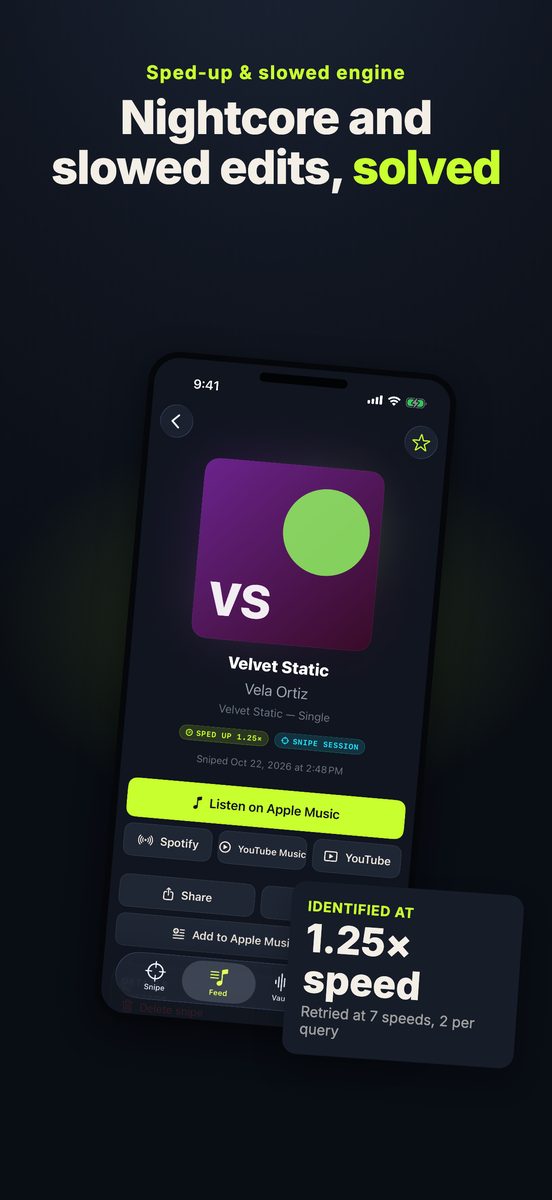
From the App Store listing. The song name is a sample.
When that isn’t enough
Some edits are further from the original than a speed change: pitched without changing tempo, layered with heavy reverb, or cut together from several songs. For music nothing could identify, TuneSnipe Pro can keep a 12 to 15 second clip in its Vault on your iPhone. Deep Snipe then retries it at 10 speeds, 4 tempos and 4 pitches, and listens for lyrics on the device. Clips can’t be exported, and they are deleted after 90 days if still unidentified.
No app can match a track that no catalog has. If the sound is an unreleased song or a creator’s own recording, the uploader is the only source.
What it costs, and where it runs
The sped-up and slowed engine and the Vault are part of TuneSnipe Pro: one in-app purchase of $7.99 (₹499 in India), with no subscription. The free version identifies songs at normal speed in sessions of up to 5 minutes, and looks up links without limit. TuneSnipe runs on iPhone only, with iOS 18 or later.
Download TuneSnipe on the App Store, or start with how to find a song from a TikTok.
Checked against TuneSnipe 1.0 on 13 November 2026.
Questions, answered
- Can Shazam recognize sped-up songs?
- Sometimes. If the sped-up version was officially released, it can be in the catalog and will match. An unofficial edit often won't, because changing the speed changes the fingerprint the catalog is searched with.
- How do I find the original of a sped-up song?
- Check the post's sound credit, search a line of the lyrics, or use a tool that corrects the speed before matching. TuneSnipe Pro replays the last 8 seconds at corrected speeds from 0.8× to 1.33×.
- Does this work for slowed and reverb edits?
- Often, since a slowed edit is the same problem in the other direction. Heavy reverb and mash-ups of several songs can still fail.
- Is the sped-up engine free?
- No. It is part of TuneSnipe Pro, a one-time in-app purchase of $7.99 (₹499 in India) with no subscription.