
How to find a song from a TikTok without a second phone
Four ways to name the song in a TikTok, a Reel or a Short on the iPhone you're watching it on: the sound credit, a link lookup, a live session, and what to do with edits.
Tap the sound name at the bottom of the TikTok first. If it names a track, you’re done. If it says “original sound”, you have three more options on the same iPhone: look up the video’s link, let an app identify the audio while the video plays, or, for sped-up and slowed edits, use a tool that corrects the speed. None of them needs a second phone.
TikTok is unavailable in India. Everything here works the same for Instagram Reels and YouTube Shorts.
1. Check the sound credit
Every TikTok shows its sound at the bottom of the video. Tap it to open the sound’s page, which names the track when the creator used one from TikTok’s library.
This fails more often than you’d hope. When someone uploads a video with the music already in it, the credit reads “original sound” and names the uploader, not the song.
2. Look up the link
Copy the video’s link (Share, then Copy link) and paste it into a song finder that reads links. In TuneSnipe you can share or paste a TikTok, Reel or Short link, and it reads the post’s public song credit. Link lookups are free and unlimited, and the post’s video and audio are never downloaded.
The limit is the same as in step 1: a link lookup reads the credit the post carries. If the post has none, there is nothing to read, and you need to identify the sound itself.
3. Identify the audio while it plays
The old advice was to hold a second phone up to the speaker. You don’t need to. An app on your iPhone can identify audio playing in another app on the same iPhone, with headphones in.
TuneSnipe is built around this. You start a session with one tap, and iOS asks you to confirm “Start Broadcast”. Then you go back to TikTok and scroll as usual, with AirPods in if you like. Each song is identified from the app’s audio as it plays. A catch arrives as a banner and in the Dynamic Island, and lands in your feed with Apple Music, Spotify and YouTube links.
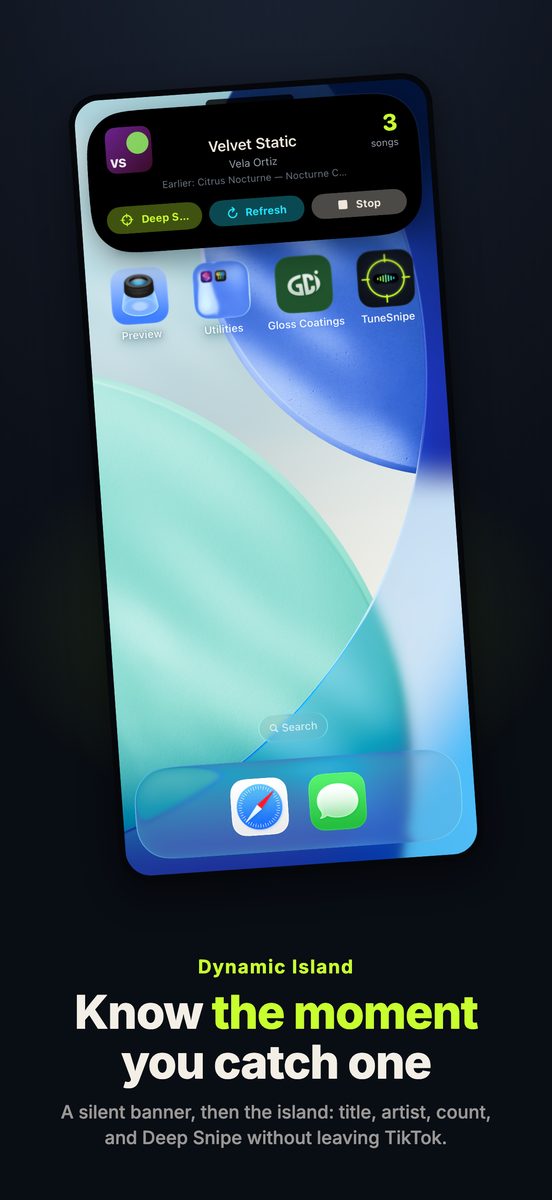
From the App Store listing. The song name is a sample.
The difference from identifying one song at a time is that the session keeps going. You don’t stop scrolling to ask what a song was; you check the feed afterwards. Free sessions run up to 5 minutes, and TuneSnipe Pro removes the limit.
On privacy, since this uses iOS’s broadcast feature: TuneSnipe never uses the microphone and never records the screen. iOS delivers video frames because that is how broadcasts work, and TuneSnipe drops each one on arrival, unread. The audio becomes a fingerprint on your iPhone, and only the fingerprint is sent to the Shazam catalog, through Apple’s ShazamKit. iOS shows its red recording indicator for as long as a session runs.
4. If it’s sped up or slowed
A lot of music in short videos has been sped up or slowed down, and an edit often won’t match the original recording. That is a different problem with its own fix: see why sped-up songs are hard to identify.
When nothing works
Some sounds can’t be identified by any app: a track that was never released, a live recording, or a mash-up of several songs. For those, TuneSnipe Pro can keep a 12 to 15 second clip in its Vault on your iPhone and retry it later. Outside the app, searching a line of the lyrics still works well when there are words to search.
What TuneSnipe doesn’t do
It runs on iPhone only (iOS 18 or later), so there is no Android or desktop version, and it can’t identify a song you hum.
Download TuneSnipe on the App Store, or read more on the TuneSnipe page.
Checked against TuneSnipe 1.0 on 13 November 2026.
Questions, answered
- How do I find a song from a TikTok?
- Tap the sound at the bottom of the video first. If it only says "original sound", paste the video's link into a song finder that reads the post's credit, or play the video while a recognition app listens to the app's audio.
- Can I identify a song playing on my own iPhone?
- Yes. An app can identify audio playing in another app on the same iPhone, through headphones too, so a second phone isn't needed. TuneSnipe does this for a whole scrolling session, and Shazam can identify in-app audio as well.
- Does this work for Instagram Reels and YouTube Shorts?
- Yes. The same steps apply: check the audio credit, look up the link, or run a session while you watch.
- Does it work in India?
- TikTok is unavailable in India. Reels and Shorts work the same way.
- Is TuneSnipe free?
- It is free to download, with sessions up to 5 minutes and unlimited link lookups. TuneSnipe Pro is one in-app purchase of $7.99 (₹499 in India), with no subscription.