
How to find a song from an Instagram Reel on iPhone
Tap the audio name, check the audio page, look up the Reel's link, or identify the sound while it plays: how to name the song in any Reel on the iPhone you're watching it on.
Tap the audio name at the bottom of the Reel. If it shows an artist and a song title, that’s your track. If it says “Original audio”, you have two more options on the same iPhone: share the Reel’s link to a song finder that reads its credit, or play the Reel while an app identifies the sound. With AirPods in, you don’t need a second phone.
1. Tap the audio name
Every Reel shows its audio at the bottom. Tapping it opens the audio page, where Instagram lists other Reels that use the same audio (Instagram Help Centre).
When the creator picked a track from Instagram’s audio library, the label names it: Instagram requires licensed audio to be attributed to the artist with the track’s name (Instagram Help Centre).
When the label says “Original audio” next to a username, the sound came with the video itself: recorded in Instagram, or already in a video the creator uploaded. That is where most song hunts start. What the label means, and why a real song can hide behind it, has its own guide.
Two things on the audio page are worth a look before you reach for an app:
- The first Reel. If the audio is someone’s original audio, Instagram shows their Reel first on the page. Its caption or comments sometimes name the song.
- The other Reels. Someone who reused the audio may have named it in their caption.
2. Look up the Reel’s link
In Instagram, tap the share icon on the Reel and copy its link, then paste it on TuneSnipe’s Feed tab, or choose TuneSnipe from the iPhone’s share sheet. TuneSnipe reads the Reel’s public song credit and finds the track, with Apple Music, Spotify and YouTube links. Link lookups are free and unlimited, and the Reel’s video and audio are never downloaded.
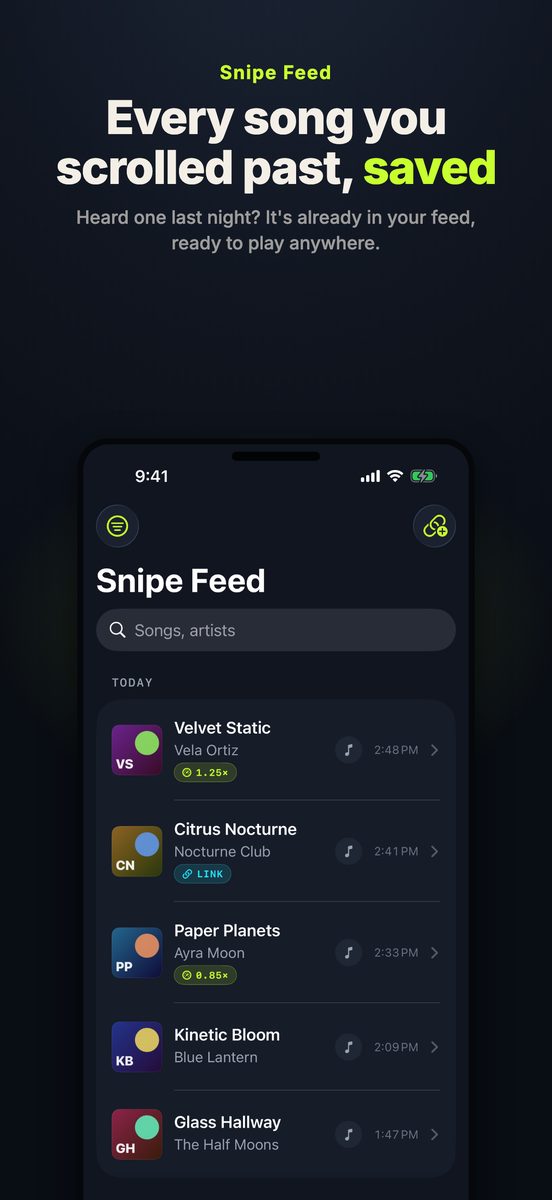
From the App Store listing. The song names are samples.
A link lookup reads the credit the Reel carries, so it can’t do better than that credit. When the Reel uses original audio, TuneSnipe says so plainly: “This post uses original audio, so there’s no song name to look up. Play it during a Snipe Session to identify it by sound.” That is the next step.
3. Identify the sound while the Reel plays
An app on your iPhone can identify audio playing in another app on the same iPhone. You don’t need to hold a second phone to the speaker.
In TuneSnipe, start a session with one tap and confirm “Start Broadcast” when iOS asks. Go back to Instagram and play the Reel, or keep scrolling. Each song is identified from Instagram’s audio as it plays, arrives as a banner and in the Dynamic Island, and lands in your feed with its links. Free sessions run up to 5 minutes; TuneSnipe Pro removes the limit.
Apple’s own Shazam control in Control Center can also identify a song playing in Instagram through headphones (Apple Support), one song at a time. What a TuneSnipe session adds is that it keeps listening while you scroll, so you check the feed afterwards instead of stopping at every song.
TuneSnipe never uses the microphone and never records the screen. iOS delivers video frames because that is how broadcasts work, and TuneSnipe drops each one on arrival, unread. The audio becomes a fingerprint on your iPhone, and only the fingerprint is sent to the Shazam catalog, through Apple’s ShazamKit.
If the Reel is sped up, slowed or muted
- Sped up or slowed. Edits often don’t match the original recording. See why sped-up songs are hard to identify and how to find the original of a slowed + reverb song.
- Muted. Instagram can mute a Reel’s music when its agreements with rights holders change (Instagram Help Centre). A muted Reel has nothing for any app to hear, so the audio name, if it’s still shown, is your only clue.
When nothing works
Some sounds can’t be identified by any app: a track that was never released, a live recording, or the creator’s own voice. TuneSnipe Pro can keep a 12 to 15 second clip in its Vault on your iPhone and retry it later at other speeds and pitches. Searching a line of the lyrics also works when there are words to search.
What TuneSnipe doesn’t do
It runs on iPhone only (iOS 18 or later), so there is no Android or desktop version, and it can’t identify a song you hum. In India, Reels and Shorts work; TikTok is unavailable there. The same steps work for TikTok and YouTube Shorts.
Download TuneSnipe on the App Store, or read more on the TuneSnipe page.
Written against TuneSnipe 1.0 and Instagram’s Help Centre on 16 November 2026.
Questions, answered
- How do I find out what song is in an Instagram Reel?
- Tap the audio name at the bottom of the Reel. If it shows an artist and a song title, that's the track. If it says "Original audio", look up the Reel's link in a song finder or identify the sound while the Reel plays.
- Why does a Reel say "Original audio" instead of the song name?
- Instagram uses the label for sound that came with the video rather than from its music library. When it detects licensed music in that sound, it changes the label to the artist and song, so "Original audio" means it hasn't matched a song.
- Can I find the song from a Reel's link?
- Yes, when the Reel carries a song credit. TuneSnipe reads the public credit from a shared or pasted Reel link for free, without downloading the video. A Reel with original audio has no song name to read, so play it in a session instead.
- Do I need a second phone to identify a song in a Reel?
- No. An app can identify the audio playing in Instagram on the same iPhone, with headphones in. TuneSnipe does this for a whole scrolling session, and Apple's Shazam control can identify in-app audio too.
- Does this work in India?
- Yes. Instagram Reels and YouTube Shorts work in India; TikTok is unavailable there.
- Is TuneSnipe free?
- It is free to download, with sessions up to 5 minutes and unlimited link lookups. TuneSnipe Pro is one in-app purchase of $7.99 (₹499 in India), with no subscription.